
*Passwords* Copy & Paste
App where your password list is GENUINELY YOURS
A simple and powerful personal password manager built for real privacy. Easy, intuitive and safe. No Internet access, No backdoors, No tricks. No leaks.
Ideal for those who handle sensitive data and need a powerful, safe and intuitive solution.
Download Now


|
Keep it secrete for real
|

No Internet, no Backdoors, no Leaks.
Similar apps claim to be safe, but they store your data on their servers - pretty contradictory, don’t you think?
Also and strangelly those similar apps install around 100 MB on your device. Of what? Of spyware ? Or of worms? Or hidden ads maybe ? One hundred megabytes of what I wonder! In contrast, this app is just 5 MB at most and I find it very heavy already.
Just think about it: Would you trust entering your Bitcoin wallet’s private keys into apps that require an online account? I wouldn’t either.
Well, that’s the situation we face today. They label their apps as ‘safe’ simply because they check if your password shows in leaked databases like haveibeenpwned.com.
Surprisingly always — and I really do mean always — it’s the same apps or companies that end up exposing your sensitive data to the dark web, and then they just say, ‘Oops, your data was leaked. Please change your password as soon as possible, good luck and bye!
When I found myself disappointed, unable to find a single decent app to simple store my private keys, I realized I had to build one and share it with people to also free them from those evil and greedy apps or companies.
I originally created this app in 2017 for myself, but I decided to publish it so a friend could download it from the App Store. Within five days, more than 4,000 people had downloaded it for free. It just shows that people are seeking for something honest and straightforward — where what you see is what you get.
I’m happy to keep it available to everyone as a humble and honest alternative to the unsafe apps that mislead and confuse people like you and me.
|
|
Copy & Paste, Edit, Duplicate, Delete
|

It's up to you to make your daily work more productive
Type any part of the password or name to easily locate the entry.
|
|
Simply works
|

We used to have applications that delivered what they promised.
Simple Key-Value entries with infinite length using UTF-8 characters and stored inside the application;
No backdoors making requests to APIs over the internet;
Tools to back up and import your password list using strong encryption;
Generate extremely strong passwords with no limits on length;
For your macOS and iOS;
|
|
Tool Export/Backup as Entrypted List
|

Keep your passwords up to date and secure
Backup all passwords at once;
Uses unique and strong encryption(and no, it's not Base64 encryption) — only this app can decrypt it;
Gives you the freedom to store your backup wherever you believe it’s safe;
Never sends your passwords through backdoors or an internet account, as the application performs no online activities — it’s blocked internally.
Exported filenames include the date and time, making them easy to organize;
If someone gets the file by 'accident', they would still need a password inside the file to decrypt it.
|
|
Generate ultra-strong passwords
|
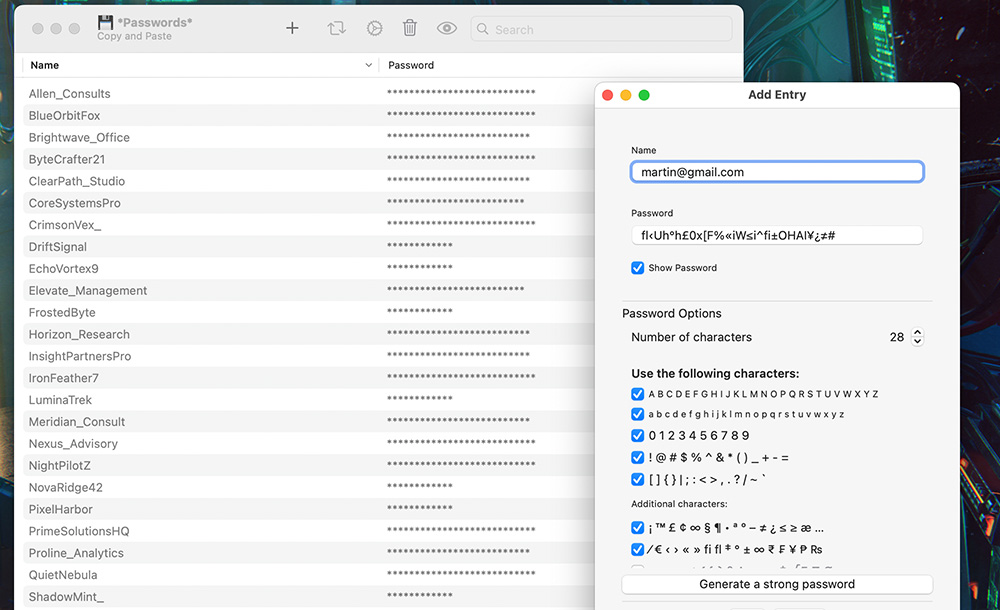
Unlimited length with support for uncommon but valid UTF-8 characters
You can select to mix the following UTF-8 characgters:
A B C D E F G H I J K L M N O P Q R S T U V W X Y Z
a b c d e f g h i j k l m n o p q r s t u v w x y z
0 1 2 3 4 5 6 7 8 9
` ! @ # $ % ^ & * ( ) _ + - = ~ [ ] { } / | ; : < > , . ?
' ¡ ™ £ ¢ ∞ § ¶ • ª º ° – ≠ ± ¿ ≤ ≥ € ₹ ₣ ¥ ₧ ₨ ⁄ ‹ › « » ‡ æ …
∈ ∉ ∀ ∃ ∄ ∫ ƒ ∂ ß µ ø † √ Ø
Á À Â Ã Ä Å Ç É È Ê Ë Í Ì Î Ï Ñ Ó Ò Ô Ö Õ Ø Ú Ù Û Ü Ý Ž Ż Ł Š Ć Č Ŕ
á à â ã ä å ç é è ê ë í ì î ï ñ ó ò ô ö õ ø ú ù û ü ý ÿ ž ż š ć č ř
А Б В Г Д Е Ё Ж З И Й К Л М Н О П Р С Т У Ф Х Ц Ч Ш Щ Ъ Ы Ь Э Ю Я
а б в г д е ё ж з и й к л м н о п р с т у ф х ц ч ш щ ъ ы ь э ю я
Α Β Γ Δ Ε Ζ Η Θ Ι Κ Λ Μ Ν Ξ Ο Π Ρ Σ Τ Υ Φ Χ Ψ Ω
α β γ δ ε ζ η θ ι κ λ μ ν ξ ο π ρ ς σ τ υ φ χ ψ ω
国 学 時 広 気 線 体 対 発
时 对 会 发 从 话
가 나 다 마 바 사 아 자 차 카 타 파 하
|
|
Fingerprint or FaceID is the master-password
|

Constantly searching for passwords? No worries.
On macOS: Open the app and use your fingerprint;
On iOS: Use your FaceID or fingerprint;
In case there isn't fingerprint or faceID configured yet, you can use one of the passwords added already to open the full list;
When you open the app, a sound is played to alert you that it has been opened, useful if you need to ensure your device hasn’t been touched;
|
|
Import a Plain Text password list (.txt)
|

Mass importation made easy.
If you have thousands of passwords, simply create a TXT file with all the key–value pairs line by line and import everything at once;
Format: Key–value pairs must follow the format: KEY : VALUE (SPACE–COLON–SPACE), line by line.
Download an example by clicking here;
|
|
Import an Encrypted password list(.plist)
|

You must know a password in the list to decrypt it.
The app will try to match the password entered with the passwords in the list.
If all your passwords are extremely hard to remember, consider adding a master password you can easily recall to open the list.
|
|
|


App Apple Store Link:
https://apps.apple.com/gb/app/passwords-copy-and-paste/id1300196608

|
|
|
App Features
Designed to facilitate daily password maganement;
Generate extremely strong passwords using complex valid UTF-8 characters;
Name and Password fields with unlimited length;
Export/Backup the entire list as an Encrypted List(.plist);
Export/Save the list of passwords as Plain Text (.txt);
Import your Encrypted Password List(.plist) to other devices (macOS or iOS);
Import a Plain Text Password List to easily insert large volume of passwords at once;
Duplicate a password to easily create a similar one by editing it;
Show/Hide all passwords in the list at once;
Instantly find any password or name by typing any part of it in the search field;
No Redundancy: Eliminates extra steps present in similar apps;
No Ads: 100% ad-free and designed to respect your privacy;
No Extortion Walls: No friction when copying and pasting, exporting, or importing passwords;
|
|
|
App Specifications
Languages
English, Arabic, Bengali, Chinese, Czech, Dutch, French, German, Greek,
Hebrew, Hindi, Hungarian, Indonesian, Italian, Japanese, Korean, Malay, Persian,
Polish, Portuguese, Romanian, Russian, Spanish, Swedish, Thai, Turkish, Vietnamese
Category
Utilities
Productivity
Size In-Memory
3.0 MB in iOS
5.2 MB in macOS
Compatibility
iOS, Requires iOS 17.0 or later.
Mac, Requires macOS Ventura 13.0 or later.
Age Rating
4+
No Internet Access
Price
Free for download
In-App Purchases Option
Unlimited password entries on the list.
Freeware version: Manage up to 9 password entries. Delete entries to keep using the app for free.
App Apple Store Link
https://apps.apple.com/gb/app/passwords-copy-and-paste/id1300196608
|
|

 PHTECH LIMITED